Inventory Management

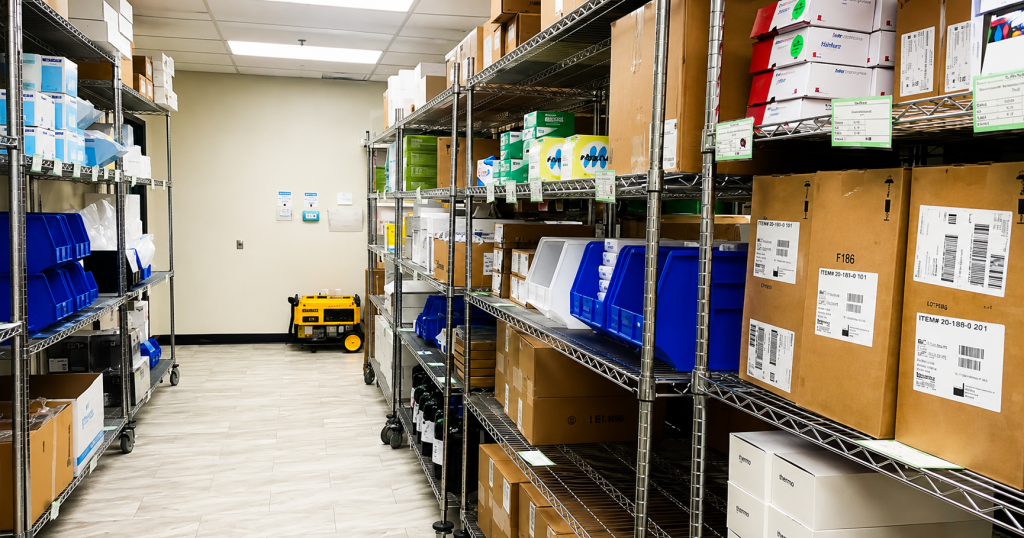
Lab with organized supplies in the storage area.
Inventory Management

Lab Inventory Management Software: Why Laboratories Need Better Inventory Control

For many laboratories, inventory management is one of those processes that works until it doesn’t. A reagent unexpectedly runs out. A box of supplies is discovered after it has already expired. Someone asks whether a replacement lot has been ordered, and nobody is quite sure. Staff start checking spreadsheets, emails, storage rooms, paper logs, or asking colleagues to piece together the answer. Individually, these may seem like small problems. But when they happen repeatedly, they consume staff time, increase costs, disrupt testing, and create unnecessary risk. These everyday challenges are exactly why lab inventory management software is becoming increasingly important for laboratories. The Problem With Manual Lab Inventory Tracking Consider some of the questions laboratory staff deal with regularly: What do we currently have in stock? What needs to be reordered? Which items are approaching expiration? Which lot should be used first? Is the new lot ready to be used? Are we purchasing more than we actually use? When this information lives in different spreadsheets, storage areas, emails, or paper records, getting a reliable answer can take time. More importantly, inaccurate lab inventory tracking can contribute to stock-outs, emergency orders, expired inventory, unnecessary purchasing, and testing disruptions. A laboratory inventory management system brings this information together so staff can see what is happening without searching through multiple sources Move From Reactive to Proactive Inventory Management One of the biggest advantages of lab inventory management software is helping laboratories identify problems before they affect operations. Instead of discovering an empty shelf when a reagent is needed, the laboratory can monitor inventory levels and identify low-stock supplies earlier. Expiration tracking provides similar protection. Knowing which reagents and consumables are approaching expiration gives staff time to use inventory appropriately, adjust purchasing, or take action before products become waste. Better visibility can help reduce last-minute ordering, overnight shipping costs, emergency borrowing, and avoidable testing delays. Reduce Reagent Waste and Control Inventory Costs Overstocking can be just as costly as running out. Without reliable usage information, laboratories may continue ordering the same quantities simply because that is how supplies have always been purchased. A good reagent inventory management system provides visibility into actual usage, purchasing patterns, expired inventory, and quantity on hand. Laboratories can use that data to make better decisions about reorder quantities, PAR levels, and purchasing frequency. The goal is simple: maintain enough inventory to support testing without tying up unnecessary budget in supplies that may eventually expire. Improve Lot Tracking and Laboratory Traceability Inventory management is not only about quantity. Laboratories also need to know which lots are available, when they were received, when they expire, and how they have been used. With digital reagent tracking and lot tracking, this information becomes part of the normal inventory workflow. If a recall, investigation, audit, or inspection occurs, staff can retrieve inventory history instead of reconstructing it from spreadsheets, binders, and emails. That creates better traceability while reducing the administrative burden on laboratory staff. Make Laboratory Inventory Easier to Manage The purpose of lab inventory management software is not simply to digitize a spreadsheet. It is to help laboratories gain control over the complete inventory lifecycle from receiving and reagent tracking to usage, expiration, ordering, and replenishment. When laboratory teams can quickly see what they have, what they need, what is expiring, and what they are actually using, inventory becomes more predictable and less reactive. For laboratories under constant pressure to improve efficiency, reduce waste, maintain traceability, and control costs, modernizing inventory management can make a measurable difference. And ultimately, laboratory staff should spend their time supporting testing and quality, not searching for supplies or updating spreadsheets.

Blog, Inventory Management

From Paper Checklists to Complete Traceability: Simplifying Inventory for Mobile Blood Drives

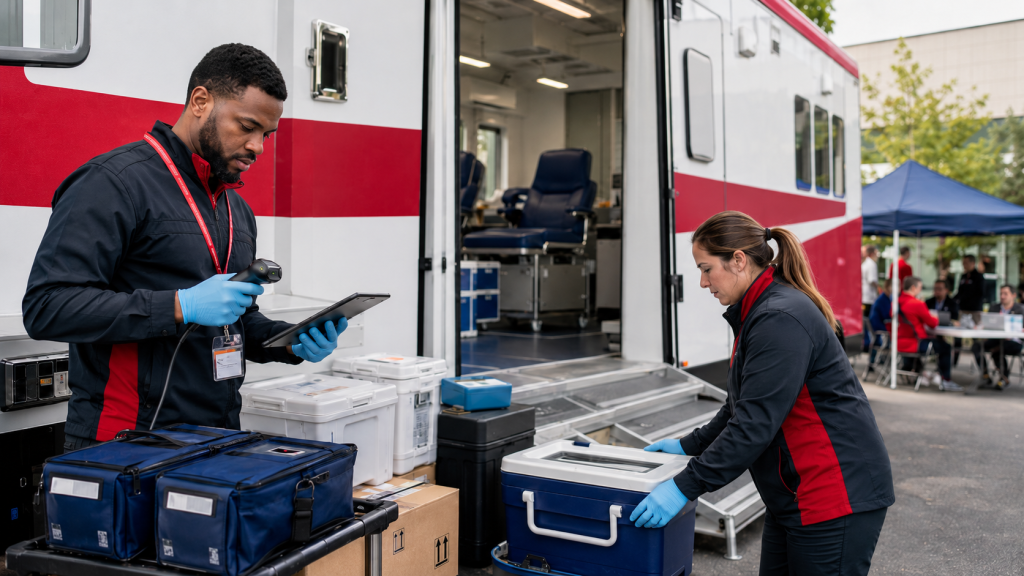
Mobile blood drives are essential for making blood donation more accessible to communities. However, behind every successful drive is a complex logistical process involving supplies, equipment, transportation units, staff, and inventory. For many blood centers, managing this process is still highly manual and inefficient. Before each drive, staff must determine which supplies and devices are needed, prepare handwritten packing lists, load transportation units, and document what is being sent. Once the drive is complete, the team must determine what was used, what remains, what was returned, and whether anything is missing or damaged. When this information is recorded on paper forms or disconnected spreadsheets, it can be difficult to answer even basic questions: Without a centralized system, blood centers may experience inventory discrepancies, limited visibility, unnecessary manual work, and difficulty tracing supplies and equipment throughout the mobile drive process. A Mobile Drive Workflow Built for Blood Centers Lab Symplified’s Mobile Drive functionality was designed specifically to help blood centers manage the complete movement of supplies and devices associated with mobile blood drives. Instead of relying on handwritten forms and manual reconciliation, blood centers can manage the workflow digitally—from initial planning through final return and closure. The process includes seven connected stages: Plan. Pack. Dispatch. Receive. Reconcile. Return. Close. Each stage creates a clear record of what happened, who completed the action, and where the supplies and equipment are within the process. Plan and Prepare the Drive The process begins when an administrator creates the mobile drive. During this stage, the administrator can organize the drive, select the required supplies and devices, and manage the transportation units that will carry them. The drive remains in a draft status while the team prepares and adjusts the required inventory. This provides a centralized packing plan instead of requiring staff to create a new handwritten list for every event. Administrators can review what is being prepared and make changes before the drive is finalized. Pack Supplies and Devices with Greater Control Once the requirements have been confirmed, the administrator packs the supplies, equipment, and devices needed for the drive. The system records what is being sent, creating a digital reference that can later be compared against what the field team receives and returns. After packing is complete, the drive moves to a packed status, indicating that the supplies and devices are ready to be dispatched and received by the field team. This creates a clear handoff between the staff preparing the drive and the staff conducting it. Confirm What Arrived at the Mobile Drive When the field team receives the shipment, they can confirm what was delivered. This is an important control point. Instead of assuming that everything packed at the blood center arrived at the mobile location, field staff can verify the actual supplies and devices received. Any discrepancies, missing items, or other issues can be documented at the time of receipt. This helps identify problems earlier rather than discovering them after the drive has ended. Once receipt is confirmed, the drive status is updated to received. Reconcile Inventory at the End of the Drive At the end of the mobile drive, field staff can document what happened to the inventory. They can record what was used, what remains, what should be returned, and whether there were any issues that require follow-up. This digital reconciliation gives the blood center a much clearer comparison between: Once this process is completed, the drive moves to a reconciled status. Administrators can then review the reconciliation and complete the appropriate return actions. Return Equipment and Close the Drive After the supplies and devices return to the blood center, the administrator can confirm the returned items, address discrepancies, and complete the drive. Closing the drive is more than an administrative step. It ensures that returned devices are properly reflected as available and that the inventory record remains accurate. Until the drive is closed, it remains visible as an active drive. Once all return actions are completed, the administrator closes the drive, and it moves into the historical record. This provides a complete history that can be reviewed later without leaving old or completed drives mixed with current activities. Clear Responsibilities for Administrators and Field Teams The Mobile Drive workflow separates responsibilities based on each user’s role. Mobile drive administrators are responsible for setting up the drive, managing transportation units and devices, packing supplies, processing returns, resolving discrepancies, and closing the drive. Field staff and team leads are responsible for confirming what they received, documenting what was used or left over, identifying what should be returned, and recording relevant notes or issues. This role-based approach helps create accountability without requiring every user to manage the entire process. Better Visibility from Departure to Return The status of each drive provides an immediate picture of where it is in the workflow: These statuses allow administrators to quickly identify which drives are still being prepared, which are currently active, which require reconciliation, and which are ready to be closed. Creating a Complete Audit Trail Every mobile drive involves multiple handoffs between people, locations, and transportation units. When those handoffs are documented manually, records can be incomplete, difficult to locate, or open to interpretation. A digital workflow creates a traceable history of the drive, including what was packed, what was received, what was used, what was returned, and which users completed each step. This can help blood centers strengthen operational oversight, investigate discrepancies, maintain more accurate device availability, and prepare documentation more efficiently when records are needed. Moving Beyond Handwritten Mobile Drive Forms Mobile blood drives will always require careful preparation and coordination. However, managing them should not depend on handwritten lists, manual comparisons, and disconnected records. Lab Symplified’s Mobile Drive functionality brings the entire process into one controlled workflow designed around how blood centers operate. By connecting planning, packing, field receipt, reconciliation, returns, and drive closure, blood centers gain clearer visibility into their supplies and devices throughout the entire journey. The result is a more organized, traceable, and accountable mobile drive

Inventory Management

Why Inventory Management Is More Critical for Rural and Critical Access Hospital Labs

Critical access hospitals (CAHs) and rural laboratories operate under some of the most challenging conditions in healthcare. With limited staff, constrained budgets, and long distances to reference labs or supplier networks, even small inventory disruptions can significantly impact patient care. In these environments, effective inventory management isn’t just an operational improvement — it’s essential for maintaining clinical continuity. A digital inventory management system like Lab Symplified can play a vital role in helping rural hospitals stay prepared, reduce waste, and deliver timely patient results. The Unique Inventory Challenges in Critical Access Hospitals Unlike large urban hospitals, critical access hospitals typically maintain limited stock levels due to budget constraints and storage capacity. However, they also need to hold safety stock because borrowing supplies from nearby facilities is often not an option. Many rural labs are geographically isolated, meaning emergency replenishment can take hours or even days. This creates a difficult balance: In many cases, these labs rely on spreadsheets, whiteboards, or memory to track inventory. When staff are rotating, on-call, or covering multiple departments, inventory visibility becomes even more difficult. A single expired reagent or unexpected stockout can halt testing entirely, forcing samples to be sent out to distant reference labs, delaying diagnosis and treatment. The Patient Care Impact of Poor Inventory Visibility In rural healthcare settings, time matters even more. If a troponin reagent runs out, cardiac patients may need to wait hours for results from a reference lab. If blood bank supplies expire unnoticed, transfusion delays can occur. If chemistry controls are unavailable, testing may stop entirely. These disruptions lead to: Digital inventory management platform like Lab Symplified directly addresses these risks by providing real-time visibility into stock levels, expiration dates, and reorder needs. How Digital Inventory Management System Helps Rural Labs A digital system like Lab Symplified simplifies inventory oversight and reduces reliance on manual tracking. Key benefits include: Proactive Low-Stock AlertsLabs receive notifications before supplies run out, preventing last-minute emergencies. Expiration TrackingAutomated alerts help staff use reagents before they expire, reducing costly waste. Centralized VisibilityAll staff can see inventory levels instantly, eliminating guesswork during off-hours. Usage-Based ReorderingHistorical usage data helps labs maintain optimal stock without over-ordering. Reduced Staff BurdenAn organized and dedicated system saves valuable technologist time, allowing focus on patient testing. Financial Benefits for Budget-Constrained Hospitals Critical access hospitals operate on tight margins, with limited reimbursement and shrinking federal funding. Every wasted reagent and unnecessary overnight shipment impacts the bottom line. Digital inventory management helps reduce: Over time, these savings can be significant especially for smaller labs. Supporting Reliable Testing in Rural Communities Rural hospitals serve communities that often have limited healthcare alternatives. When testing is delayed, patients may need to travel long distances or face delayed treatment decisions. Ensuring consistent testing availability is essential. By implementing a digital inventory management system, critical access hospitals can: For rural laboratories, inventory management is not just about supplies; it’s about ensuring care is available when patients need it most. A modern digital solution like Lab Symplified helps critical access hospitals stay prepared, efficient, and focused on delivering timely, high-quality care.

Blog, Inventory Management

Manual vs. Digital Lab Inventory Management: What’s the Real Cost?

Manual lab inventory management might seem “free,” but that couldn’t be further from the truth. The time, waste, and risk involved in using spreadsheets, whiteboards, sticky notes, or Kanban boards come at a significant hidden cost. In this post, we break down the true costs of manual inventory systems vs. the savings and efficiency you can expect with a digital solution like Lab Symplified Lite. The Hidden Costs of Manual Inventory Let’s look at what manual lab inventory management is really costing your lab: 1. Wasted Staff Time Updating spreadsheets, sending emails, printing logs, and double-checking supply closets takes hours each week hours your staff could spend on testing or patient care. 2. Expired Reagents and Supplies Without expiration tracking, inventory often goes unused until it’s too late. Tossing just $2000/month in your entire lab expired supplies = $24,000/year in avoidable waste. 3. Duplicate Orders When teams operate in silos, ordering errors are bound to happen. A couple of duplicated orders a month can quietly inflate your budget. 4. Failed Audits or Inspection Prep Compliance penalties, audit stress, and reputational risk add up. Delayed validation, QC or missing  lot traceability record could lead to major consequences. The Benefits of Going Digital with Lab Symplified Lite Lab Symplified Lite is designed to give small-to-medium labs everything they need to take control of their inventory without the complex and costly solution. Enhanced Visibility Know exactly what’s in stock, where it is, and when it expires.  Automated Alerts Get notified when stock is low or items are nearing expiration, so you’re always ahead.  Proactive Compliance Maintain logs, assign tasks, track proficiency tests, and generate digital audit trails with ease.  Cost Savings By reducing waste and over-ordering, most labs see ROI within the first few months. Manual lab inventory management isn’t just inefficient—it’s expensive. Switching to a digital solution like Lab Symplified Lite saves you time, money, and compliance headaches. Ready to upgrade from spreadsheets? Sign up today and try Lab Symplified Lite free for 2 weeks  Start Your Free Trial

Inventory Management System For Labs
Inventory Management

Top 5 Signs Your Lab Has Outgrown Spreadsheets For Inventory Management

Spreadsheets are often the starting point for managing lab inventory. They’re free, familiar, and flexible until they start breaking down. If your lab is dealing with inventory surprises, delayed reorders, or failed audits, your spreadsheet may be doing more harm than good. Here are 5 clear signs it’s time to move beyond spreadsheets and upgrade to a smarter inventory management system built for labs. 1. You’re  Repeatedly Running Out of Stock  If your team is frequently scrambling for supplies, it’s a red flag. Spreadsheets can’t warn you in real-time when supplies are running low. Without automated alerts, you’re always reacting instead of planning. With Lab Symplified Lite Inventory Management System, you get proactive stock level alerts and par-level tracking to prevent stockouts before they happen. 2. Duplicate Orders Are Becoming Common Multiple team members managing a shared spreadsheet or submitting orders via email is a recipe for miscommunication. One click too many can lead to expensive duplicate purchases or unnecessary waste. Lab Symplified Lite Inventory Management System centralizes requests, tracks order status, and eliminates duplication saving both time and money. 3. You’re Throwing Away Expired Supplies Expired inventory isn’t just wasteful, it’s a compliance risk. Spreadsheets don’t send expiration warnings or maintain traceable lot histories. The result? Costly throwaways or, worse, usage of expired items. With Lab Symplified  Lite, you’ll get automated expiration tracking and real-time alerts, helping your lab stay compliant and efficient. 4. Quality Tasks Are Disorganized and Hard to Track Maintaining a reliable Quality Management System (QMS) requires clear records of lot numbers, expiration dates, validations doc, QC, and lot-to-lot testing. But in many labs, those records are buried in binders, paper logs, or scattered across files and folders. Worse yet, they often have no easy way to tell which lot is currently in use, which shipment is new, or whether the required QC was ever performed. This leads to confusion, missed validations, delayed QC, and disrupted workflows. Lab Symplified Lite brings order to the chaos. It allows you to: This not only improves day-to-day efficiency, but also makes your lab inspection-ready, supporting compliance with CAP, CLIA, or ISO standards. It’s a huge upgrade for labs trying to move from reactive to proactive quality management. 5. Inventory Audits Are Inconsistent and Untraceable Inventory audits are crucial to keeping supplies in check but most labs today still handle them manually. Tasks are often assigned to a small group, with no structured system to track when audits were last done, who completed them, or what was missed. Paper logs get lost. Excel files don’t trigger reminders. And without clear accountability, audits are delayed, rushed, or skipped leading to unexpected stockouts and compliance issues. Lab Symplified Lite changes that. With its built-in Inventory Auditing feature: This transforms inventory auditing from a chaotic chore to a streamlined, systematic process ensuring traceability, accountability, and timely completion. Spreadsheets served their purpose but when they start holding your lab back, it’s time for something better. Lab Symplified Lite is built specifically for labs like yours: Are you ready to ditch the spreadsheet chaos? Sign up today and get a month of Lab Symplified Lite for free; no commitment. Start Your Free Trial

Inventory Management

How to Master Lab Inventory Management: 5 Game-Changing Strategies

Laboratory inventory management can feel like an endless battle, constant reordering, missing supplies, and wasted reagents all lead to operational inefficiencies and unnecessary expenses. If your lab struggles with tracking supplies, maintaining organization, and preventing stockouts, you’re not alone. The good news? With the right strategies, you can transform your inventory process from chaotic to streamlined. In this guide, we’ll cover the five essential steps to conquering lab inventory, saving time, reducing waste, and ensuring compliance. Plus, we’ll explore how an inventory management system like Lab Symplified can take your inventory management to the next level. The Hidden Costs of Poor Lab Inventory Management Many labs still rely on outdated tracking methods, spreadsheets, paper logs, or verbal communication. These inefficiencies can lead to: If any of this sounds familiar, don’t worry, you can fix these issues with a structured approach. Let’s dive into the five key steps to optimize lab inventory management. Optimize Your Storage Space Problem: Many labs operate in cramped spaces, leading to cluttered storage and frequent ordering in small quantities. Solution: Step 2: Implement Smart Organization Strategies Problem: Disorganized storage leads to misplaced items, wasted time, and excess orderings. Solution: Step 3: Reduce Human Error with Simple Systems Problem: Manual tracking leads to forgotten log entries, miscounts, and lost supplies. Solution: Step 4: Gain Data Insights for Smarter Ordering Problem: Without real-time usage data, ordering decisions are based on guesswork Solution: Step 5: Standardize and Centralize Inventory Processes Problem: Inconsistent tracking across departments leads to confusion and miscommunication Solution: Why Manual Methods Aren’t Sustainable (and What to Do Instead) While spreadsheets and paper logs might work in the short term, they require constant effort and are prone to human error. Labs that switch to inventory management software see: ✅ 80-90% reduction in expired reagents ✅ Faster stock reconciliation (saving hours of manual work) ✅ Improved compliance and audit readiness. That’s where Lab Symplified comes in. Lab Symplified: The Smarter Way to Manage Lab Inventory Lab Symplified is an inventory management system designed specifically for laboratories. It helps you: ✅ Track inventory in real time with automated stock updates.✅ Receive low-stock alerts before running out of critical supplies.✅ Analyze usage trends to optimize ordering and reduce waste.✅ Keeps track of lot no. and expiration date.

Team
Lab Software Implementation, Laboratory General

From Lab Tech to Director: How Lab Symplified Benefits Your Entire Team

Labs are constantly seeking ways to optimize operations and maximize efficiency. While individual tools can offer isolated benefits, the true power lies in adopting solutions that unify your team and drive collective success. Think of your lab as an ecosystem where every member plays a vital role. From your staff doing hard work at the bench to the lab managers and directors ensuring smooth operations, everyone drives your organization towards a shared goal.  Lab Symplified was designed with this holistic approach in mind. By simplifying tasks, streamlining workflows, and providing access to critical information, Lab Symplified helps to break down silos and unite your team towards a common purpose. This article explores how Lab Symplified’s diverse features cater to the unique needs of each lab role. Inventory Management For Labs Quality Management System Module for Labs Proficiency Tests Tracking For Labs Digital Shift Report For Labs Digital Maintenance Logs for Labs (Coming Soon…) In summary, Lab Symplified is a unified solution that empowers labs to achieve operational excellence. Lab Symplified unlocks the true potential of your lab and its team by fostering collaboration, streamlining workflows, and providing actionable insights.

Inforgraphic for blog
Inventory Management, Laboratory General

4 Ways Labs Manage their Inventory

Effective inventory management is crucial for laboratories, as it ensures that essential supplies and materials are readily available for experiments, tests, and procedures. Laboratories manage inventory through various methods, ranging from traditional manual tracking systems to more sophisticated software solutions. Proper inventory management helps prevent shortages that could disrupt research or clinical workflows, reduces waste by monitoring expiration dates, and enhances overall operational efficiency. By maintaining an accurate inventory, labs can make informed decisions about restocking and resource allocation, ultimately supporting their mission to deliver reliable results and maintain high standards of quality in their work. Manual Tracking Systems Many laboratories rely on manual tracking methods, such as: Card-Based Systems Several labs use card-based systems for inventory management: Collaborative Approaches Smaller labs often rely on team effort for inventory management: Software Systems Regardless of laboratory size or inventory volume, software systems offer significant advantages over traditional methods: Enhanced Visibility: Real-time tracking of inventory levels across multiple departments and locations. Improved Control: Automated reordering, lot and expiration date tracking, and usage analytics. Data-Driven Decisions: Generate reports on inventory turnover, usage patterns, and cost analysis. Reduced Errors: Minimize human error in counting and data entry. Time Efficiency: Automate routine tasks, freeing up staff for more critical duties. Scalability: Easily adapt to growing inventory needs without major system overhauls. By implementing a software-based inventory management system, laboratories can streamline operations, reduce costs, and improve overall efficiency. Lab Symplified advantage:

Blog image From Hesitation to Innovation
Lab Software Implementation

From Hesitation to Innovation:  A Guide to Implementing New Software Smoothly

The lab environment thrives on consistency and precision. So, it’s understandable that introducing new software can feel unsettling. But in today’s competitive healthcare landscape, embracing new technology and software is crucial for providing exceptional care and streamlining operations. Here’s why some lab leaders hesitate to implement new software, and how you can navigate a smooth transition: Understanding the Hesitation: Turning Hesitation into Progress: 1. Define Your Needs, Conquer Your Fears: Before diving in, clearly identify your lab’s pain points. Is data analysis cumbersome? Do repetitive tasks and lack of proper tools hold back productivity? Is the current system adding extra stress to your staff and draining your financial resources? Once you know what needs fixing, research software solutions that address those specific issues. This focused approach will build confidence in the benefits of the new software and return on investment. 2. Prioritize Security: Evaluate the software vendor’s security measures thoroughly. Ensure they have certifications such as HIPAA compliance if handling patient data, along with strong data encryption protocols. Request detailed information about their data storage practices and accessibility safeguards to ensure comprehensive protection. 3. Ensure Compatibility: Assess whether the software is compatible with your current infrastructure. Determine if it can seamlessly integrate with your existing instruments and data management systems. Collaborate with your IT team and the vendor to ensure a smooth integration process. If the software is intended to function as a standalone solution without integrating with other systems, evaluate how well it fits within your workflow. 4. Invest in Training and Support: Successful software adoption relies on a well-trained team. Opt for software that offers extensive training resources, and consider vendor-led workshops, on-site training, and hands-on implementation support. Ongoing vendor support, both during and after deployment, is essential for smooth onboarding and long-term success. Case Study: Lab Symplified A great example of a software solution designed specifically for laboratories is Lab Sympified. This inventory management and compliance management software addresses common lab challenges. Lab Sympified is built on industry-standard security measures and integrates with existing lab workflows seamlessly. It requires minimal involvement from lab staff and provides excellent customer support throughout the implementation process. Embrace the Future of Lab Efficiency: Modern software solutions can revolutionize the laboratory. They streamline data management, automate routine tasks, and improve collaboration. By addressing your fears, prioritizing your needs, and planning for a smooth transition, you can transform your lab into a data-driven powerhouse that delivers exceptional results. Request a Demo:

Scroll to Top